


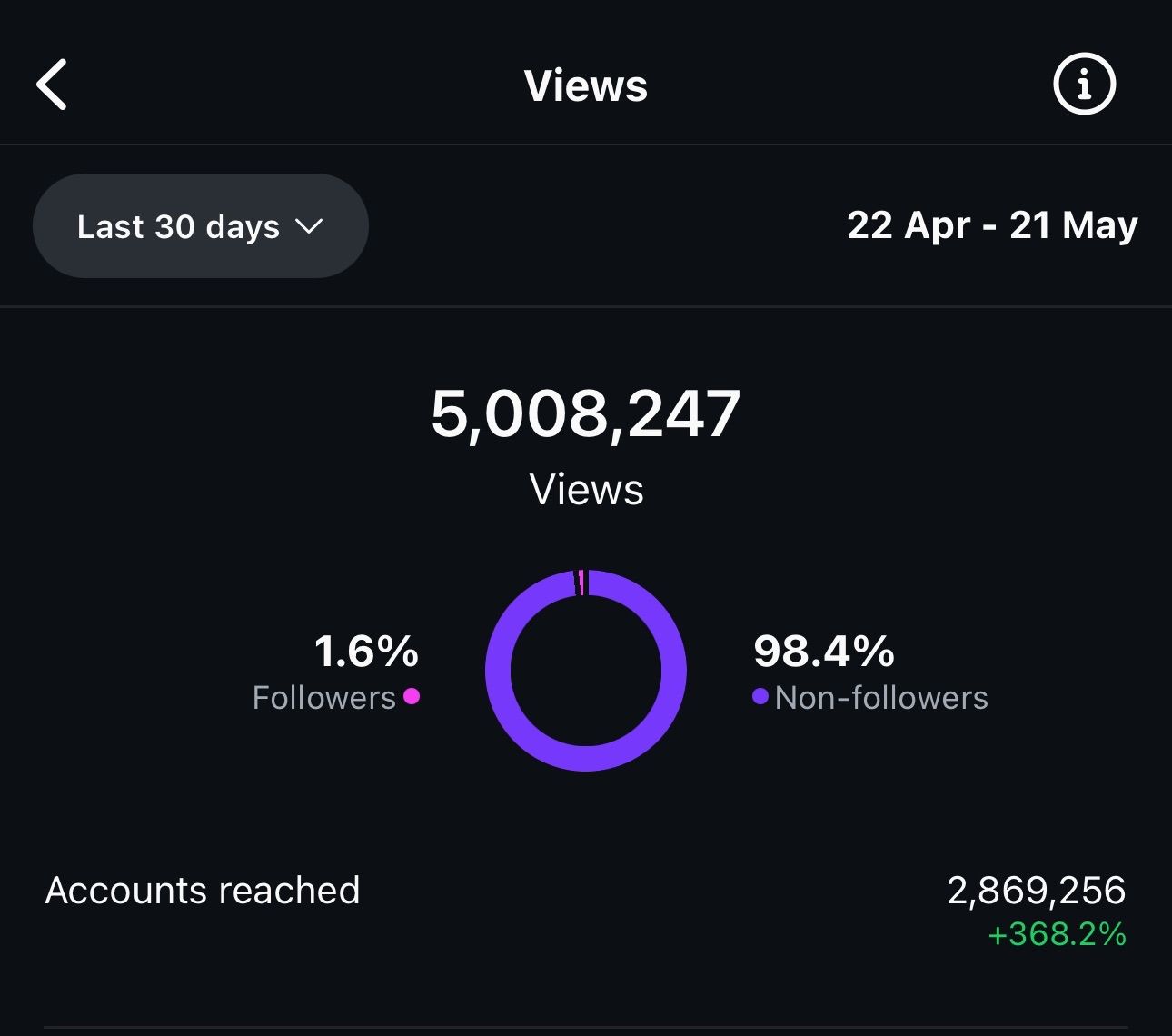
Updated: Jan 7
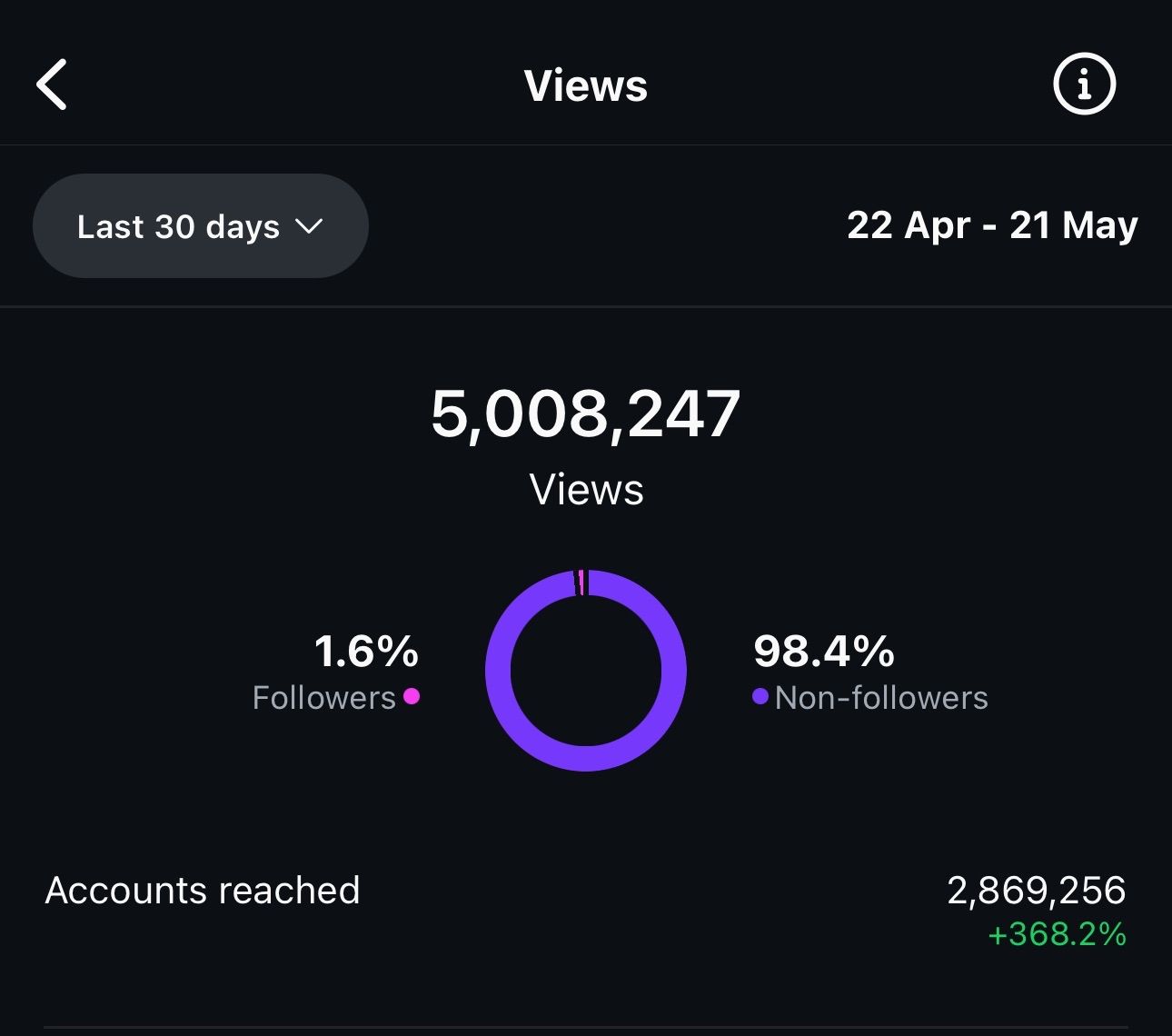
5M+ Monthly Impression
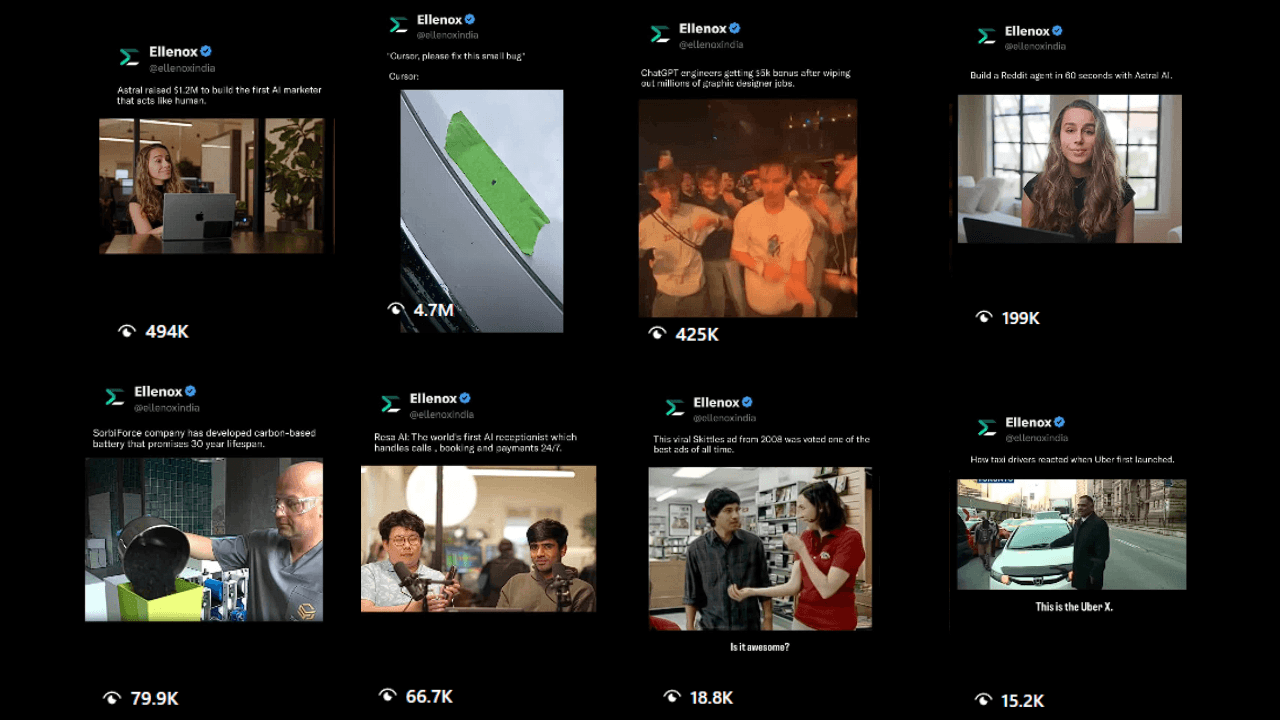
Video Outliers on Ellenox's Account
What changed? Before vs After
Before
→ Generic Startup Content
→ No Content Pillars defined.
→ No branding
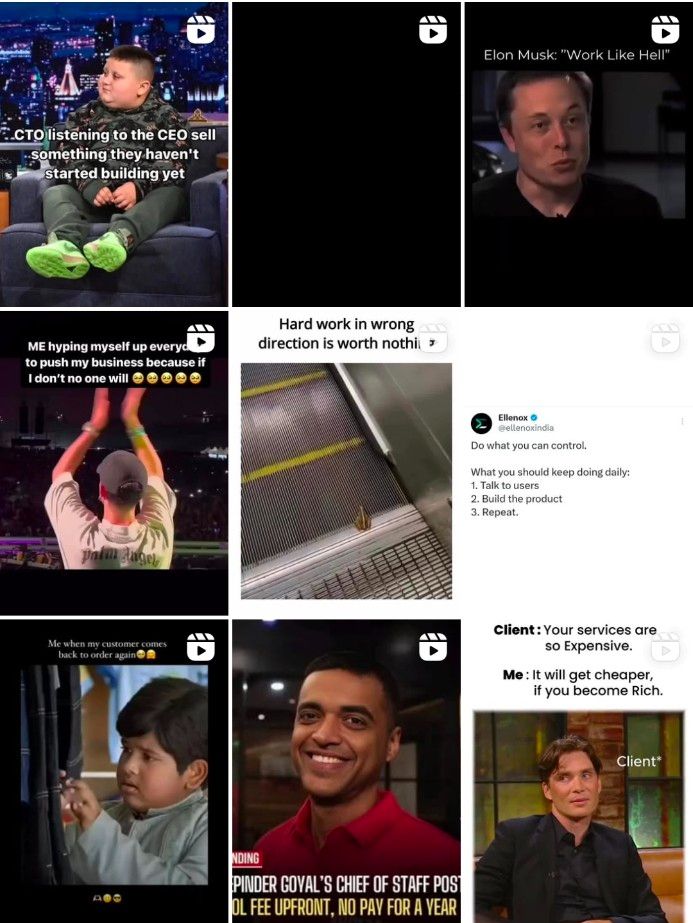
Before
After
→ Focused and Niche Content
→ Fixed Content Pillars
→ Branding on point
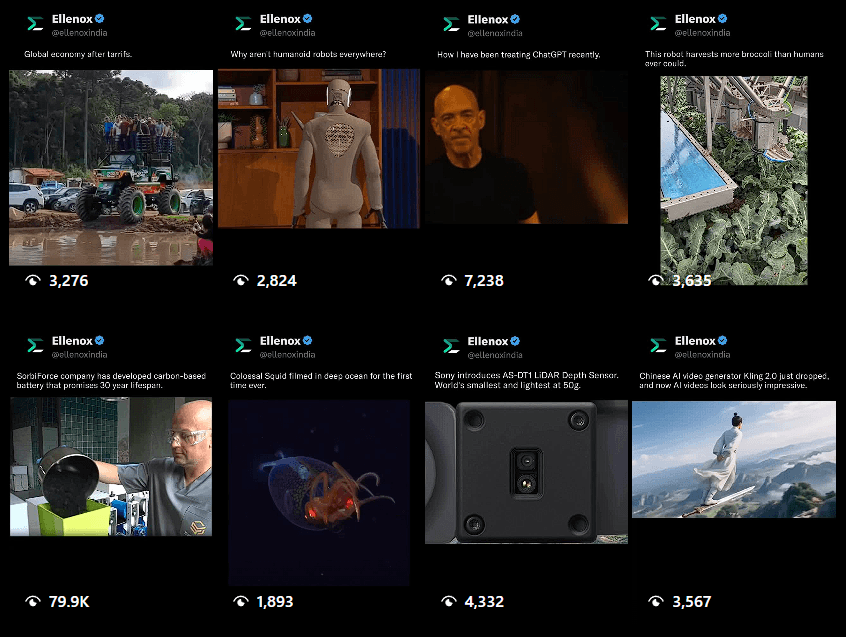
After
Content Strategy
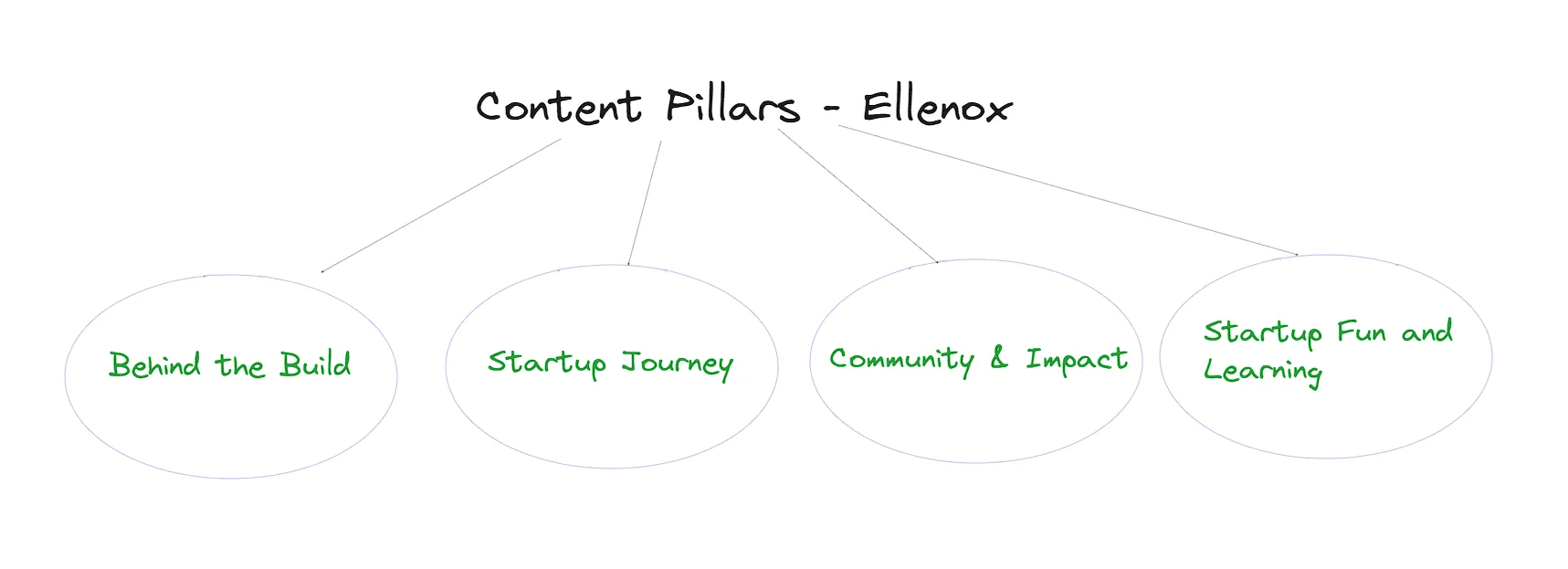
Content Pillars
→ Before you start creating posts, organize them into content buckets. Then, reverse-engineer your content strategy from those buckets.
→ Ask yourself, “What topics do I love talking about and can keep talking about without burning out?”
Here are Ellenox’s content pillars:
Content Pillars
How to Come Up with Content Ideas
Here are few ways you can come up with ideas:
Comment-Section Echo – Export top comments under viral posts in your niche, cluster repeated questions, and answer each in a 30-sec Reel. (Hook: “Everyone keeps asking… so here’s the real answer.”)
Opposite-Day Takes – Flip common advice (“Post daily!” → “Why we stopped posting daily and grew faster”). Contrarian hooks spike watch-time.
Google Autocomplete Chain – Type your niche term + a letter (e.g., “startup f…”) and screenshot the autocomplete phrases. Rapid-fire answer each suggestion in a Reel series.
Asset Remix – Turn your best-performing carousel or tweet into a Reel: add motion text, beat-synced zooms, and a call-out sticker (“Save for later”).
“New” Filter on Reddit & Quora – Sort threads by newest + keyword; low-vote, unanswered questions are blue-ocean topics. Record a quick “Here’s what no one’s told you yet…” explainer.
Idea Workflow
Collect (Day 1) – Spend 60 min harvesting 2–3 idea wells above.
Cluster (Day 2) – Group by pain-point; kill duplicates.
Score (Day 3) – Rank each on R-I-S: Reach potential, Implementation ease, Story potency. Anything ≥ 8/10 goes on the calendar.
Prototype (Day 4) – Draft hooks + first 3 s, test one on Close Friends, then ship.
Dos & Don’ts of Idea Mining
Do:
→ Screenshot inspiration immediately; save to a “Swipe File Sunday” folder.
→ Track watch-time & saves to spot winning themes.
→ Pair every idea with a micro-call-to-action (save, share, comment).
Don’t:
→ Rely on generic “post more” advice.
→ Copy competitors verbatim - add a twist or story.
→ Ignore flopped posts; the lessons inside failures spark better follow-ups.
Posting Cadence & Timing Experiments
What we have been following at Ellenox:
– 3 Reels + 3 Stories every day
• Reel #1 @12 AM = catches West-coast US & early-risers in India
• Reel #2 @8 : 30 AM = commuter scroll window (IST)
• Reel #3 @7 PM = India prime-time + late EU/UK lunch break
What you can do to find out your time?
→ Go to your analytics tab and get this data.
!
| Week | Variable Tweaked | What to Do | Success KPI |
|---|---|---|---|
| 1 – Control | Nothing (your current 3 × 3) | Post exactly as usual to lock a clean baseline. | Avg Reach & Watch-Time per slot |
| 2 – Time-Shift | Move Reel #1 from 12 AM ➜ 2 AM | Tests late-night US prime time | +10 % Reach on Reel #1 |
| 3 – Frequency Cut | Drop the 8:30 AM Reel (2 Reels/day) | Checks if scarcity boosts engagement on remaining posts. | Engagement Rate (Likes+Comments) |
| 4 – Story Burst | Keep Reels at Week 2 timings; double Stories to 6/day (3 AM + 3 PM bursts) | Measures whether Stories lift Reel discovery. | Follows From Profile Visits |
Trial Reels
Use the Trial Reel feature given by Instagram. If you don’t know how it works?
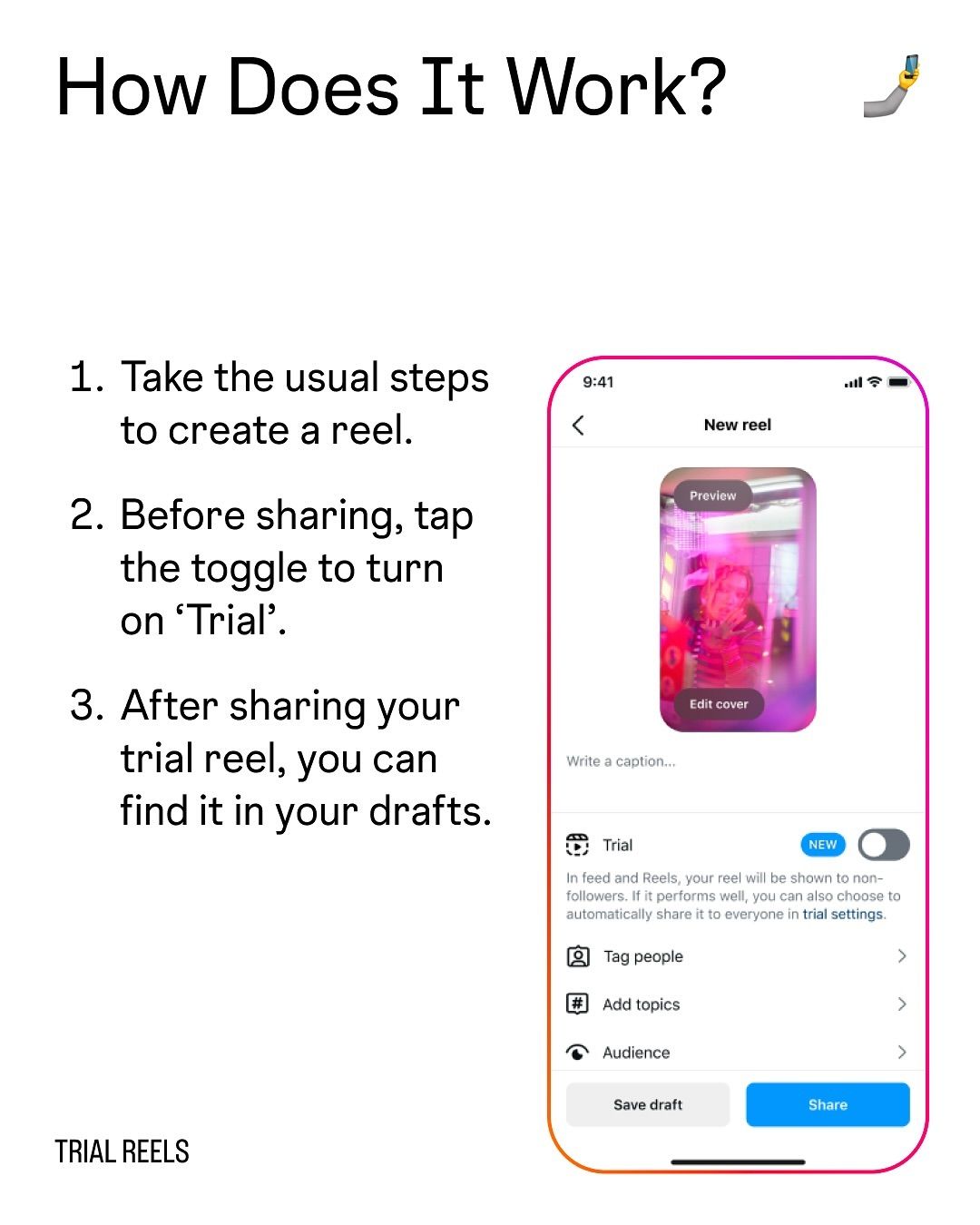
Trial Reel Feature
Few tips that helped us get 5M+ impressions:
Recycle Old Winners
Re-upload past viral clips as trials; the algorithm treats them as fresh content for non-followers and often pushes them hard.
Set the 72-Hour Auto-Upgrade
Turn on “Automatically share if views > [X] within 72 h” to capture momentum while you sleep.
A/B Cuts, Same Footage
Post two versions 24 h apart: swap only the first three seconds or the soundtrack.
Quick Implementation Checklist
✔️ Switch to Creator/Business (if you haven’t).
✔️ Draft two clip variants; label the difference in your content sheet.
✔️ Post Variant A as a Trial Reel; log key insights at +24 h.
✔️ Archive losers but keep notes, failures often spark winning hooks later.
Product Launches
During these months we also launched two products(a lot more coming…)
For this we have used ManyChat Automation for comments and follows.
!
!
Why ManyChat?
Turns every comment, follow, tag, or Story-mention into an automated (but human-feeling) DM that drives in seconds. new followers, email opt-ins, and warm leads.
Instagram DM Flows
1. Comment-for-Link (Keyword: PLAYBOOK)
How it works: When someone comments "PLAYBOOK" on your post:
They get a DM immediately: “Here’s the PDF 🔗”
Then, 20 minutes later, they get a second DM: “Quick Q: What’s your biggest IG struggle?”
Goal:
Collect emails
Start a conversation
2. Comment + Follow Gate
How it works: When someone comments:
If they aren’t following you → You send a friendly message: “Tap follow & reply DONE to grab the link.”
If they are following → You send the link right away
Goal:
- Increase your followers
3. Story-Mention Reply
How it works: When someone tags @yourhandle in their Story:
- They get a DM with a thank-you + bonus resource (like a coupon or freebie)
Goal:
Encourage user-generated content (UGC)
Build social proof
Best-Practice Tips that we used:
Use a UNIQUE, short keyword (all-caps, 1 word) per Reel so you can track which content drives opt-ins.
Add a 2-3 s typing delay before the first DM, it feels human and dodges the “bot” vibe.
Deliver the promised value in the FIRST message; save the ask (reply, email capture, etc.) for message #2.
Quick-Reply Buttons > raw links — buttons like “SEND PDF” boost taps & keep you compliant with Meta’s DM policies.
Personalize every message with {{first_name}} and 1-2 emojis; it lifts reply rates by ~12 %.
Stay inside Meta quotas (≤ 150 messages per user / 24 h) to avoid throttling.
Test flows on a burner IG account before going live — check keyword detection, follow gate, and link tracking.
Dos and Don’ts for Instagram Growth
✅ Dos
Engage in the first 30 minutes – Reply to every comment & DM while the post is “fresh”; early interaction tells the algorithm the content’s worth pushing further.
Hook in the first 3 seconds – Lead with motion text, a question, or a “pattern break”; 70 % of viewers bounce if you don’t earn attention fast.
Batch-create & schedule – Film multiple Reels per session and queue them; consistency beats bursts of inspiration followed by silence.
Pair every post with a micro-CTA – “Save for later,” “Share with your co-founder,” or a keyword comment; trains followers to interact.
Use data, not vibes – Review Reach, Saves, Shares, and Follower Growth weekly; double-down on the top 20 % performers.
❌ Don’ts
Don’t buy followers, likes, or comments – Inflated numbers crater real reach once the algorithm spots low engagement ratios.
Don’t rely on engagement pods – Artificial loops trigger spam signals and skew your analytics.
Don’t delete a “flop” inside 24 h – Reels often surge after 8–12 hours; premature deletion resets ranking history.
Don’t cross-post TikToks with watermarks – Instagram explicitly deprioritises recycled, branded content.
Don’t over-hashtag – Stick to 3–5 highly relevant keywords; banned or generic tags (#follow4follow) can shadow-ban posts.
🎁 A little bonus from us!
Here are some of the prompts we use in our content workflow.
Feel free to tweak them, remix them, or plug them straight into your own process.
If these results caught your eye, imagine what we could do for your brand. Click the 'Contact Us' button, and we'll handle the rest.
[
Contact Us